Once you’ve tried the presets, the next question is usually “Can I combine these?” Yes, and it’s one of the most rewarding parts of working with frequencies. Here’s how combining works, what sounds good, and how I build my own custom tones.
Three ways frequencies combine
1. Two ears, two tones: binaural beats
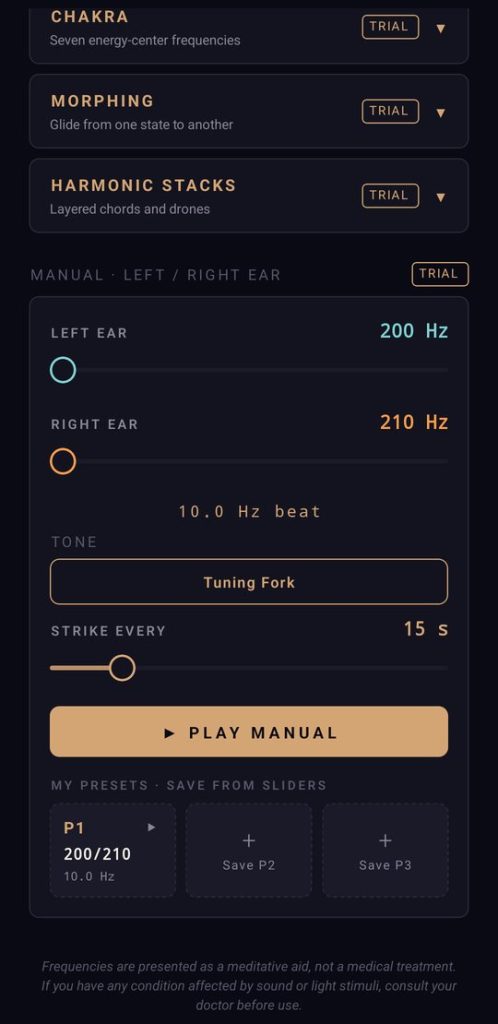
The simplest combination is a different tone in each ear. The gap between them becomes the beat. 200 Hz and 210 Hz gives you a 10 Hz Alpha beat. This is the heart of binaural beats. (The basics are in What Are Binaural Beats?)
2. Many tones, both ears: harmonic stacks
Layer several tones at musical ratios, like a root, its fifth and its octave, and you get a chord or drone. The Harmonic Stacks section in the app has six of these. Here’s how they’re built.
3. A “healing” tone with a beat on top
You can put a solfeggio or chakra frequency in one ear and a slightly different one in the other. You get the character of that tone plus a binaural beat. This is how I built my favorite preset.
My custom preset: 963 Hz and 965 Hz
When I’m working hard on something and need energy and focus, I use 963 Hz in my left ear and 965 Hz in my right. 963 Hz is the Crown frequency from the solfeggio scale. The 2 Hz difference adds a slow pulse underneath.
Technically, 2 Hz is in the Delta range, usually linked to sleep. But it doesn’t make me sleepy. That high, clear 963 Hz tone keeps me centered and focused, and the slow pulse keeps it from feeling harsh. It’s a good reminder that combining frequencies is personal. The numbers are a starting point, and your own experience is the real test.
More on 963 Hz in 528 Hz, 963 Hz and Other “Miracle” Frequencies.
Why I built the manual sliders
When I looked at other binaural apps, they all seemed to overlook one thing: letting you create your own beats. You got their presets and that was it. So in Binaural Tones, you can set each ear anywhere from 0 to 10,000 Hz, see the beat you’re creating in real time, and save your three favorite combinations as personal presets. You can also switch the sound to a Tuning Fork tone that rings and re-strikes every 5 to 60 seconds.
Tips for building your own
- Keep the beat under about 30 to 40 Hz. Wider than that and your brain hears two separate tones instead of a beat.
- Lower tones give a clearer beat. The effect is strongest under about 1,000 Hz. 963 Hz is near the top of that range.
- Start from a preset you like. Then nudge one ear up or down a few hertz and listen.
- Listen for at least 10 minutes before deciding. First impressions change.
- Write down what worked. Then save it so it’s one tap away.
- Keep the volume low, especially with higher tones.
What not to do
- Don’t stack lots of high tones. They get piercing fast.
- Don’t play two different binaural beats at once from two apps. The result is a mess, not a “double dose.”
- Don’t chase extreme numbers. More isn’t better.
Try it yourself
You can hear a five-second sample of every preset, free, on the Try It page. If you want the full experience, download Binaural Tones on Google Play. Everything is unlocked for your first 24 hours. Try everything, then let me know what you thought.
Binaural Tones is a relaxation and focus aid, not a medical treatment. This post is general information, not medical advice. If you have epilepsy or any condition affected by sound, check with your doctor before using it.