Search “binaural beats” in any app store and you’ll get hundreds of results. Most look the same. I built my own app after trying a lot of them, so here’s what I think actually matters, whether you end up using mine or not.
1. Seamless, click-free audio
This is the big one, and most people don’t know to look for it. Cheap or rushed apps often have a small click or pop every time a sound loops, starts, stops or switches. Your brain notices every one, and it pulls you right out of a relaxed state.
I’ve heard those clicks in other apps, and honestly, I had them in mine at first too. I took the time to rebuild every tone so the loops, starts, stops and switches are seamless. The result is a smooth tone that’s ready for any length of session.
How to test: play a tone for a few minutes with headphones and listen for any tick or blip.
2. The ability to make your own beats
Presets are a great start, but everyone’s brain is different. Most apps seemed to overlook letting you create your own binaural beats. Look for:
- Separate controls for each ear.
- A wide frequency range.
- A way to save your favorites.
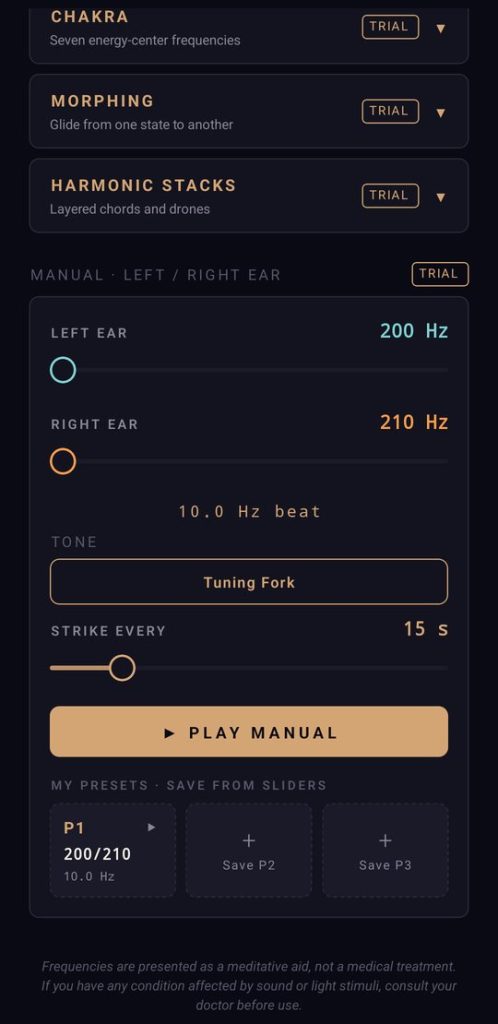
Binaural Tones has manual sliders for each ear from 0 to 10,000 Hz and three personal presets. My own go-to is 963/965 Hz, a combination no preset would ever have given me. Here’s how to build your own.
3. More than one type of tone
Binaural beats need headphones. A good app also offers options for when you can’t wear them, like isochronic tones that work on a speaker. (Here’s how they differ.) Gradual “morphing” journeys, chords and single meditation tones round things out.
4. Works offline, plays with the screen off
If an app streams audio, it uses data and stops when your connection drops. Tones generated on your phone work anywhere, including on a plane or in a basement, and should keep playing with the screen off.
5. Honest pricing
Watch out for:
- Subscriptions for what is basically a tone generator.
- Free versions that are too limited to actually test.
- Ads that interrupt your session.
Here’s how I set up Binaural Tones: the six binaural presets are free forever. When you install, everything is unlocked for 24 hours so you can try every section. After that, the extra sections are a one-time $4.44 Pro unlock. No subscription, no ads, no account.
6. Privacy
A tone app doesn’t need your email, location or contacts. Check the permissions and the data safety section on the store listing.
7. Honest claims
Be wary of apps that promise to cure anything. Binaural beats are a relaxation and focus aid. Here’s an honest look at what the research says.
Try it yourself
My advice for any app: use the free trial hard. You can hear a five-second sample of every preset, free, on the Try It page. If you want the full experience, download Binaural Tones on Google Play. Everything is unlocked for your first 24 hours. Try everything, then let me know what you thought.
Binaural Tones is a relaxation and focus aid, not a medical treatment. This post is general information, not medical advice. If you have epilepsy or any condition affected by sound, check with your doctor before using it.