Open any frequency app and you’re hit with a wall of numbers. 3.5 Hz, 10 Hz, 40 Hz, 528 Hz. Which one is “right”? Here’s the simple way I think about it, and the shortcut I use when the presets aren’t quite what I want.
Start with what you want to feel
Don’t start with the number. Start with the goal, then pick the matching brainwave band:
- Sleep: Delta, about 0.5 to 4 Hz. Try the Sleep preset (3.5 Hz).
- Meditation and deep relaxation: Theta, about 4 to 8 Hz. Try Relaxation (6 Hz) or Gateway (4 Hz).
- Calm focus: Alpha, about 8 to 13 Hz. Try Focus (10 Hz).
- Energy and active thinking: Beta, about 13 to 30 Hz. Try Energy (18 Hz).
- Alertness and peak attention: Gamma, 30 Hz and up. Try Insight (40 Hz).
Those numbers are the beat, the difference between your two ears. The tone you actually hear is much higher, usually 100 to 300 Hz. More on the bands in my brainwave field guide.
Then pick the type of tone
Binaural beats: headphones on
Best for sleep and meditation, when you can wear headphones and want a soft, smooth sound.
Isochronic tones: no headphones needed
A single pulsing tone that works on a speaker. Good for focus at your desk or when you share a room. (Here’s how the two compare.)
Morphing journeys: when you’re not there yet
If your mind is racing and you want to sleep, a tone that starts where you are and glides to where you want to be often works better than jumping straight to Delta. My favorite is Deep Relax, which glides from Alpha to Theta.
Chakra frequencies and harmonic stacks
These aren’t brainwave beats. They’re single tones and chords used as a focal point for meditation. I explain the difference in Binaural Beats vs. “Healing Frequencies”.
When the presets don’t fit, build your own
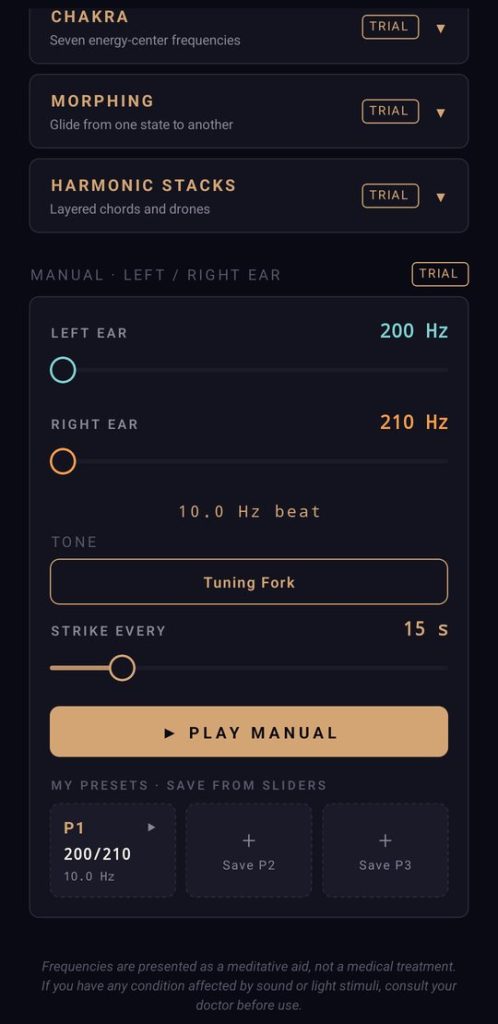
This is the feature I’m proudest of, and the one I felt every other app overlooked: the ability to create your own binaural beats. In Binaural Tones you can set each ear anywhere from 0 to 10,000 Hz and save your favorites to three personal presets.
Here’s mine. When I’m working hard on something and need energy and focus, I run 963 Hz in my left ear and 965 Hz in my right. On paper that’s only a 2 Hz beat, which is technically in the Delta range. That’s usually linked to sleep. But for me, that high, bright 963 Hz tone with a slow pulse underneath keeps me sharp and centered. That’s exactly why custom tones matter. Your experience won’t always match the textbook, and you should be able to tune it to what works for you.
A quick way to test
- Pick one goal and one tone. Listen for 20 minutes.
- Next time, try the next band up or down.
- Note which one leaves you feeling the way you wanted.
- Save your winner. If none of them are quite right, build your own.
Try it yourself
You can hear a five-second sample of every preset, free, on the Try It page. If you want the full experience, download Binaural Tones on Google Play. Everything is unlocked for your first 24 hours. Try everything, then let me know what you thought.
Binaural Tones is a relaxation and focus aid, not a medical treatment. This post is general information, not medical advice. If you have epilepsy or any condition affected by sound, check with your doctor before using it.